Nutrition Labeling Software for Food Businesses

With ReciPal's nutrition label software, you can create nutrition and supplement labels for your products to comply with food regulations and grow your business.

ReciPal’s team of labeling experts can review your labels to ensure key components are correct.

Create your free label!

Nutrition analysis made easy

  • Choose from our ingredients or create your own
  • Modify amounts quickly and easily
  • Use subrecipes, scale, and copy recipes to save time
  • Automated ingredient lists and allergens

Nutrition labeling that's flexible

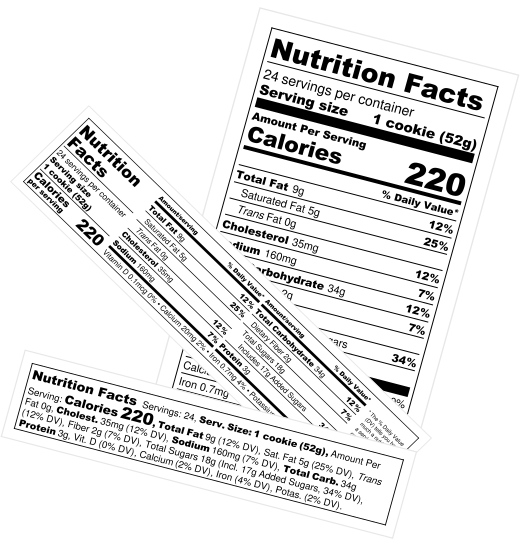
  • Choose from our various compliant label styles
  • Sensible defaults with the ability to customize
  • Save and print your labels in designer friendly formats

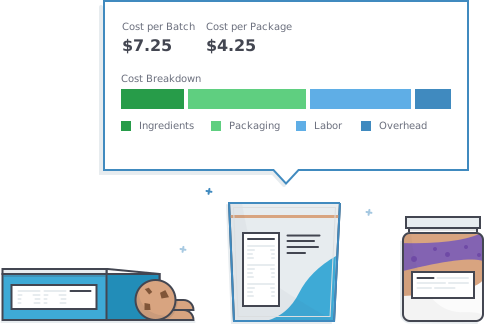
Recipe costing to make decisions

  • Input your ingredient and packaging costs
  • Quickly understand your cost breakdown
  • Make decisions on pricing and cost cutting

How to make your nutrition label with our software

ReciPal turns your recipe into a print-ready nutrition facts panel that follows FDA and CFIA formatting, rounding, and allergen rules in three steps. No nutrition expertise required.

Enter your recipe

Paste or type your ingredients and ReciPal's AI Jumpstart matches them to our database and sets quantities for you.

Set servings and review

Choose your serving size and yield, then check the nutrition analysis, ingredient statement, and automatically flagged allergens.

Download your label

Pick a compliant FDA or CFIA label format, customize the look, and export it as a PNG or PDF that's ready for your packaging.

Trusted by thousands of food businesses
Create your own free label today!

Ingredient lists in seconds


Automatically create ingredient lists following FDA and CFIA guidelines in seconds. Edit ingredient names after they've been put in descending weight order for you, and customize the look and feel on your labels.

Recipe management in the cloud

Privately and securely
backed up in the cloud
Access from anywhere
on any device
Easily share
with colleagues

Inventory management

  • Automatically update and trace inventory
  • Plan for production and track income
  • Handle recalls easily and efficiently

Sign up for free!

Let our software help with the boring nutrition and recipe management work and get back to what you really love

Customer service that listens


Real people who’ve created thousands of labels answering your phone, email, and chat questions in real time. We take your feedback and build it into ReciPal.

Frequently asked questions


Why do you need a nutrition label?

If you're in the food industry, you may be wondering who needs nutritional facts. Two rules cover most packaged food products:

  • Nutrient claims. This is the number one rule that requires nutrition facts labeling. If you make any nutrient claim on your package label or website -- "high in fiber," "low fat," and the like -- you have to include nutrition facts, even if you would otherwise meet an exemption.
  • Retail sales thresholds. Retailers with more than $50,000 of food sales and more than $500,000 of total sales are required to have nutrition labels. This rule covers both your own business and any business that sells your product, so if you want to be in almost any grocery store, you'll need nutrition facts labels.

Many food companies start providing nutrition facts on their labels before they are required. It's good practice, it provides a layer of transparency for your customers, and it just seems like the right thing to do. Using nutrition labeling software like ReciPal can make this process easy by allowing you to input ingredients yourself or working with a labeling expert.

How do you make a nutrition label?

Creating a nutrition label is easy when using nutrition labeling software. To create a nutrition label with ReciPal, you can access our free nutrition label templates to easily input nutrient information if you already have it, or use our nutrition analysis software if you have a recipe and ingredients but don't yet have the nutrition data. Even if you’re unable to conduct your own nutrient analysis, one of our experts can walk you through it and/or review your nutrition facts label to ensure it meets all label requirements.

How much does it cost to make a nutrition label?

You can access ReciPal’s nutrition label software at three different price points:

  • Single Serving: $29 per recipe
  • Business: $59 per month
  • Business Plus: $129 per month

By creating a free account, you’ll get full access to make a recipe/label and see just how easy it is to use ReciPal. Get started now!

Can I switch to ReciPal from other nutrition labeling software?

Yes. Food businesses can rebuild their recipes quickly in ReciPal, which usually takes minutes per product rather than hours. Paste a recipe into our nutrition analysis software and AI Jumpstart matches your ingredients automatically, or add your own private ingredients from an existing spec sheet or nutrition label. If you have a lot of recipes, our API can load ingredients, recipes, and costs programmatically. We also offer full-service migrations from select platforms.

ReciPal applies current FDA and CFIA formatting and rounding rules. If you'd like a second set of eyes, one of our labeling experts can review your labels after the switch.

Read our customer reviews

“So many of our small businesses struggle to get nutrition labels done, this is a much needed resource that we'll be incorporating into our curriculum.”

Leticia Program Developer, La Cocina Incubator

“I love your product as a start-up food company! Thanks so much!”

Kristy Owner, Paleo Supply Co

“This is really wonderful!!! Thank you!”

Sausan Owner, Bitchin' Baklava

“Great service! Will definitely use again. Will recommend highly to others.”

Alan Operations, Carolina Farmin'

“ReciPal is a brilliant product. I've gone through a number of alternatives and I really appreciate how much this has simplified my life.”

Kevin Co-Founder, immi

“I wish I had known about this earlier! I just wasted $160 getting my nutritionals done!”

Cesario Manager, El Pajaro Kitchen

ReciPal: Simple Food Labeling Software

Join some of the most successful food brands in creating nutrition labels, costing your products, and tracking inventory on ReciPal.

Create your free label!

Nutrition labeling software features


  • FDA + CFIA Compliance – updated by our team of experts to strictly follow all regulatory changes in the US and Canada.
  • Robust Database – Full USDA database of ingredients, plus over 10 years of specialty ingredients added by ReciPal and users with a wide range of unit options.
  • Custom Ingredients – Add private ingredients to the database with our AI tool that automatically transfers data from existing spec sheets or nutrition labels. Generate all standard volume measures from one reference amount. Plus, get the ability to create non-food ingredients like packaging or labor for more accurate cost tracking.
  • Nutrition Analysis – Search ingredients (with prioritized results based on your usage), set quantities, and immediately generate compliant nutrition labels with all formatting and rounding rules applied. Set recipe yield by package size or servings size and easily adjust for waste or moisture loss.
  • AI Jumpstart – Paste or type your recipe and ReciPal automatically identifies the right ingredients and amounts. Create compliant nutrition labels in minutes, not hours or days.
  • Nutrition Fact Panels – ReciPal covers US (FDA) and Canadian (CFIA) label formats with practically all layout options available. Labels can be downloaded as PNG, PDF, or displayed online via a dynamic embed code.
    • FDA (USA) – Vertical, Tabular, Linear, Per Serving / Container, As Packaged/As Prepared, Aggregate, Infant (0-12 months), Child (1-3 years), 100 Grams
    • CFIA (CAN) – Vertical, Linear, Horizontal, Dual Column (Foods Requiring Preparation and Different Amounts of Food), Aggregate, 100 Grams, all with customizable French, English, and bilingual setups. Front of package label requirements automatically customized based on recipe and available to download.
    • USDA (Old FDA) – Vertical, Tabular, Linear, As Packaged/As Prepared, Aggregate, Infant (0-2 years), Child (2-4 years)
  • Supplement Facts Labels – FDA-compliant Supplement Facts panels for Adult, Child, Infant, Pregnant & Lactating, with multicolumn and proprietary blend support.
  • Label Customization – Tons of options to tailor the size, layouts, and elements, such as: simplified format, shortened footnote section, abbreviated terms, compact vitamins (i.e. display vitamins side by side) and a width slider that gives you the ability to change the dimensions of each label type to suit your needs. Additionally, you have the option to hide added sugars (with a footnote) and show any optional vitamins, unsaturated fats, sugar alcohols, or the protein percentage.
  • Automated Allergens – Automatically populate allergens on labels based on recipe ingredients based on our allergen database or your own settings.
  • Bioengineered Ingredients – Automatically detect and denote bioengineered ingredients.
  • PDCAAS Adjustments – Change the protein % displayed on the label by entering your PDCAAS.
  • Overrides – manually adjust the calculated results of the database analysis to account for things like fat loss, vitamin breakdown, or lab specific results.
  • Nutrient Content Claims – Get alerts for applicable claims like low-fat, high in fiber, or excellent source of protein.
  • Nutrition Breakdown Report – Full non-rounded nutrient information at the individual ingredient level per serving and per 100 grams, exportable to CSV. See which ingredients are driving any given nutrient with a per-ingredient contribution breakdown.
  • Ingredient Statements – Automatically generate ingredient statements in descending weight order with the ability to fully customize how they display on the label. With one click, denote ingredients that are less than 2% of the total recipe or combine ingredients from subrecipes to avoid duplication.
  • Recipe Management – Easily scale recipes, store prep instructions, track changes, manage multiple users, and filter by tags to bulk download labels, archive recipes, or save any aspect to CSV.
  • Sub-Recipes – Turn a recipe into an ingredient and use it in other recipes with any changes flowing through to related recipes for nutrition, ingredient lists, allergens, and costs.
  • Recipe Costing – Track recipe costs per package and per batch. Add in costs for packaging, labor and overhead to gain a full understanding of your all in costs. View changing costs over time and set desired margins for each of your recipes.
  • Barcodes – Add a barcode with one click, including UPC-A, EAN-13, and Code128. Generate ready-to-use barcodes directly in ReciPal.
  • API Integration – Programmatically update ingredients, recipes, and costs through our API.
  • Customer Service – Dedicated US-based customer service that you can contact by phone, email, or in app chat. Super quick response times with direct access to expert help whether technical or regulatory.
  • Tutorials – Quick, easy-to-follow tutorial videos for each aspect of the process with step by step breakdowns.

Sign up for free!

Let our software help with the boring nutrition and recipe management work and get back to what you really love.