Custom Ingredient Units in ReciPal
If you're using a nutrition label maker, flexible ingredient units can save a huge amount of time and help prevent recipe setup mistakes. At ReciPal, we’ve made custom ingredient units even more flexible and easier to use.
Creating Units in ReciPal
Every ingredient in ReciPal is tied to a weight-based nutrition profile (for example, nutrition per 100g). When creating an ingredient, all standard weight units are automatically available, including grams, ounces, pounds, and kilograms.
You can also create custom equivalencies to support volume measurements or workflow-specific units. For example:
- 1 cup = 125g
- 1 case = 150lb
Note: entering a volume measure will create all other standard volume measures. For example, if you create an equivalency for 1 cup it will automatically generate volume units for teaspoon, tablespoon, fl oz, pint, quart, gallon, mL, Liter.
This lets you build recipes using the units your team already works with every day.
What’s New
Previously, custom units could only be added to ingredients you created yourself. Now, you can also add custom units directly to subrecipes and public ingredients
This makes recipe building much more flexible.
For example:
- If you create a seasoning subrecipe, you can set up volume units like tablespoons and cups so staff can quickly use the right amount in different recipes.
- If you use a USDA flour ingredient but purchase flour in 50 lb bags, you can create a custom “bag” unit for easier recipe entry.
We’ve also streamlined the setup process by allowing units to be added directly from the recipe editor.
How It Works
Adding Units to New Ingredients
You can set up units in the process of creating a new ingredient. When creating your ingredient, use the "Measures" section at the bottom of the ingredient form to add custom units.

Adding Units to Public Ingredients
Public ingredients now include a "My Custom Measures" section on the ingredient detail page. From there, you can add your own custom units.

Adding Units While Building Recipes
The fastest option is now built directly into recipe editing.
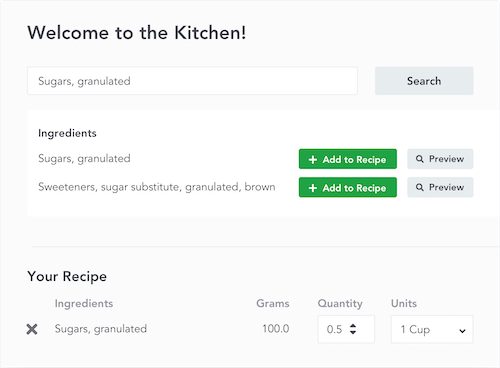
Inside the unit dropdown menu, you’ll see an "Add Custom Unit" option. Clicking it opens a popup where you can create a new weight or volume unit without leaving the recipe page.


No extra navigation. No interruptions to your workflow.
Editing Existing Units
Need to make changes later? That’s easy too.
- Public ingredients: update units in the "My Custom Measures" section on the ingredient detail page.
- Custom ingredients and subrecipes: on the ingredient detail page click "Edit" and update the "Measures" section at the bottom of the ingredient form.
Why It Matters
Recipe software should adapt to the way your business actually operates. Having the right units available at your fingertips helps reduce conversions, minimize mistakes, and make recipe setup faster for your entire team.
At ReciPal, we focus on building tools that reflect how real food businesses work in practice. If there’s a feature that would make your workflow easier, we’d love to hear about it.