Creating Juice Nutrition Labels
While many of our resources cover nutrition labeling for food products, ReciPal also works great for drinks. In this blog we'll take a deep dive into creating FDA compliant juice labels. This guide walks through everything you need to know—from selecting the right ingredients to setting serving sizes, and declaring percent juice. Follow these tips to create a compliant, accurate juice nutrition label with confidence.

Quick Juice Labeling Facts
- Juice RACC (Reference Amount Customarily Consumed): 1 cup (8 fl oz)
- Single-serving containers: Any container under 16 fl is considered a single serving. The serving size can be listed 1 bottle or 1 can (whatever best describes the container).
- Dual-Column Labeling: Containers between 16–24 fl oz require a dual-column Nutrition Facts label to show the nutrition per serving and per container.
- Percent (%) juice declaration This is required and typically found above the Nutrition Facts panel.
Making a Juice Nutrition Facts Panel in ReciPal
1. Select the Right Ingredients
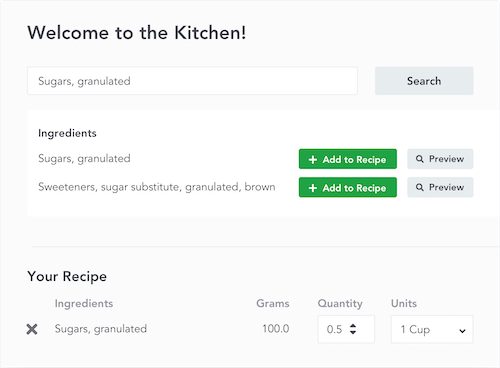
When creating a juice recipe, we recommend choosing ReciPal’s cold-pressed juice ingredients. Ingredients added by the ReciPal team are displayed with a check mark.

- Juicing removes much of the fiber but retains most vitamins and minerals.
- ReciPal’s cold-pressed ingredients automatically adjust nutrition values to reflect this.
Important clarification:
An ingredient like “Oranges, raw, all varieties, cold pressed juice” still represents the raw fruit before juicing. You are not adding liquid juice to the recipe—you are adding whole fruit that will be juiced. ReciPal handles the nutrition changes for you.
2. Use Weight Measures Whenever Possible
For the most accurate results:
- Use weight (grams, ounces, pounds, etc.) instead of volume or counts.
- Weighing raw produce is more consistent than entering “3 oranges” or “1 gallon of oranges.”

3. Enter the Juice Output
After entering all ingredients, set up the label using Package Size and tell ReciPal how much juice the batch produces.
Example:
- 3 oranges weighing 400 g total
- Batch yields 8 fl oz of juice
In ReciPal:

Note: Cold-pressed juice ingredients already account for juicing waste. You may see a moisture loss value in the system—this is expected and can be ignored.
Juice Serving Size, Servings per Container & Net Quantity Statement
Because the FDA sets the juice RACC at 8 fl oz, serving size and label format depend on container size. Here are some common juice container sizes and labeling guidelines.
| Package Size | Serving Size | Servings per Container | Net Quantity Statement |
|---|---|---|---|
| 8 fl oz | 1 bottle | 1 | 8 FL OZ (237 mL) |
| 12 fl oz | 1 bottle | 1 | 12 FL OZ (355 mL) |
| 15.2 fl oz | 1 bottle | 1 | 15.2 FL OZ (450 mL) |
| 16 fl oz | 8 fl oz | 2 | 16 FL OZ (1 PT) 473 mL |
| 20 fl oz | 8 fl oz | 2.5 | 20 FL OZ (1.25 PT) 591 mL |
| 24 fl oz | 8 fl oz | 3 | 24 FL OZ (1.5 PT) 710 mL |
| 32 fl oz | 8 fl oz | 4 | 32 FL OZ (1 QT) 946 mL |
| 59 fl oz | 8 fl oz | 7 | 59 FL OZ (1.84 QT) 1.74 L |
When Is a Dual-Column Label Required?
The FDA requires dual-column Nutrition Facts labels when a container has 2–3 servings. Since juice servings are based on 8 fl oz, containers between 16–24 fl oz must use dual-column labels. ReciPal will automatically generate the correct format when your serving setup falls in this range.
Making a Juice Blend
Juice blends are easy to create in ReciPal and follow the same labeling rules as single juices.
- Create a recipe for each individual juice.
- Select More → Create Subrecipe.
- Use those juices as ingredients in your blend.
- Set the amount each juice contributes to the final recipe.

Serving sizes, package setup, and dual-column rules work the same as they do for a single juice.
NoteWhen using subrecipes, select "combine ingredients from subrecipes" option on the ingredient statement page to streamline your ingredient list.
Formatting Options
Simplified Format
Many juices qualify for the simplified format option. This option removes nutrient categories that are zero making a more streamlined and compact label. If you product qualifies for this you can turn in it from the label page. Optional Nutrients → Show in simplified format

Single Serve
If you are selling a product that is a single serving, you are allowed to remove the statement of number of servings per container. When the serving size is a bottle there's not much point to tell consumers there's one serving. Label Style → Single Serving
Percent (%) Juice Declaration Rules
Most juice products are required to declare the percentage of juice on the label, typically above the Nutrition Facts panel. You can check out the full details here, but as an overview:
- 100% juice products must declare “100% Juice”.
- Juice blends must declare the total percentage of juice.
- Products with added water or other ingredients must still declare % juice.
- The declaration must be clear, prominent, and expressed as a percentage.
- For juice from concentrate, the percentage is based on reconstituted juice.
We've made it super simple to calculate percent juice with an easy to use tool.
Wrapping it up
Creating a compliant juice nutrition label doesn’t have to be complicated. By using ReciPal’s proprietary cold-pressed juice ingredients, you can generate accurate labels. Whether you’re labeling a single juice or a blended product, ReciPal is built to handle the details so you can focus on making great juice.