Creating Ice Cream Nutrition Labels
Ice cream is one of the most popular products on ReciPal and a common source of labeling questions. Between volume-based net quantity statement, overrun, and serving size rules, ice cream labels have a few unique quirks.
Below are our top tips for creating a compliant ice cream nutrition label, with practical examples you can apply directly in ReciPal.
Ice Cream Labeling Basics
Let’s walk through how to set up a nutrition label for a 1-pint container of ice cream, starting with the Principal Display Panel (PDP).
The PDP is the front, most visible part of the package. FDA regulations require two key elements on the PDP:

Statement of Identity
The statement of identity is the common or usual name of the food.
For example, a bag of Doritos must say “tortilla chips” on the front. Some foods also have a standard of identity, which defines what a product must contain in order to use a specific name.
To be labeled as ice cream, the product must meet FDA requirements, including:
- At least 10% milkfat
- A minimum of 20% total milk solids
- A weight of at least 4.5 pounds per gallon
- At least 1.6 pounds of total solids per gallon
If your product meets these criteria, the PDP must state “Ice Cream.”
Net Quantity Statement
The net quantity statement tells consumers how much product is in the container, excluding the packaging.
Key rules:
- Must include U.S. customary units (oz, lb, fl oz) and metric units (g, mL, L)
- Must appear in the bottom 30% of the PDP
- For ice cream, the quantity must be expressed as a volume
Customarily ice cream labels lead with the largest whole unit rather than fluid ounces (for example, “1 Quart” instead of “32 fl oz”).
Common Ice Cream Net Quantity Statements
| Container Size | Net Quantity Statement |
|---|---|
| Pint | 1 Pint (473 mL) |
| Quart | 1 Quart (946 mL) |
| 1.5 Quart | 1.5 Quart (1.42 L) |
| Half Gallon | Half Gallon (1.89 L) |
Setting Your Label in ReciPal
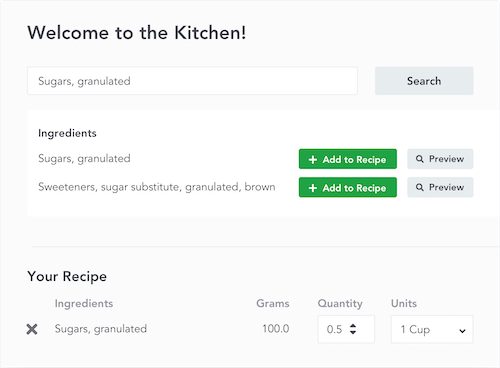
When creating ice cream labels in ReciPal, we recommend setting up your yield by package size. This allows you to properly account for overrun.
.png)
What Is Overrun?
Overrun is the percentage increase in volume that occurs when air is incorporated into ice cream during freezing. Because air is added, the final ice cream volume is greater than the liquid mix volume.
This is one of the cases where a recipe yield above 100% is expected.
How to Calculate Overrun
To calculate overrun, compare the volume of the liquid mix to the volume of ice cream produced.
For example, if 100 liters of liquid mix produces 170 liters of ice cream, the overrun is 70%. You calculate this by subtracting the mix volume from the ice cream volume, then dividing by the mix volume.
(Ice Cream Volume - Mix Volume) / Mix Volume
(170L - 100L) / 100L = 70%
Net Weight Per Package
Even though the net quantity statement for ice cream is volume-based, the Nutrition Facts label must list the serving weight in grams.
In ReciPal:
- Enter the net weight per package as the gram weight of the container’s contents
- The most accurate method is always to weigh the finished product
Estimating Weight Using Overrun
If you know your overrun but don’t know the finished weight, you can estimate it by dividing the container’s volume by the overrun percentage plus one.
For example, for a 1-pint container (473 mL) with 70% overrun, dividing 473 by 1.7 gives an estimated weight of about 278 grams.
Volume of one container / (Overrun % + 1) = weight of container
473mL / 1.7 = 278.2
As a general rule, 1 milliliter is equal to 1 gram (for liquids of similar density to water), though actual weight varies based on ingredient density.
Serving Size for Ice Cream
The FDA’s reference amount customarily consumed (RACC) for ice cream is ⅔ cup.
A pint contains 2 cups. Dividing the cups per container by the serving size gives the number of servings.
# of cups in a container ÷ ⅔ cup per serving = # of servings per container
Two cups per container divided by two-thirds of a cup equals 3 servings per container. A pint of ice cream will always have 3 servings.
Servings by Container Size
| Container Size | Servings |
|---|---|
| Pint (16 fl oz) | 3 |
| Quart (32 fl oz) | 6 |
| 1.5 Quart (48 fl oz) | 9 |
| Half Gallon (64 fl oz) | 12 |
If you want help calculating overrun, estimating weight, or figuring out the number of servings, we built an ice cream calculator tool.
Serving Weight
For a pint of ice cream that weighs 278g and has 3 servings the serving weight will be 92g per serving (278g / 3 servings). This is automatically calculated in ReciPal when you enter the weight of a package and the servings per package.
The serving size line would read:
Serving Size: ⅔ Cup (92g)
Depending on overrun and ingredients, a ⅔-cup serving of ice cream typically weighs 80–100 grams, but this can vary significantly by product.
Dual-Column Nutrition Labels for Ice Cream
FDA rules require dual-column Nutrition Facts labels when a product contains 2–3 servings per container. This means nutrition information must be shown per serving and per container.

Since a pint contains 3 servings (and ice cream is especially easy to eat 3 servings in a sitting) dual-column labels are required - the FDA changed this rule with products like pints of ice cream specifically in mind.
ReciPal automatically enables dual-column labels when your product qualifies, so no extra setup is needed.
Key Takeaways
- Set up your yield by package size to account for overrun
- The volume of your yields will exceed 100% due to air incorporation
- The FDA serving size for ice cream is ⅔ cup
- A pint always contains 3 servings
- Serving weight in grams is required even though net quantity is volume-based
- Pints require dual-column Nutrition Facts labels